

Hello. I have only learned of the existence of eBlocker and I am super impressed and excited to try it.
I have downloaded the latest v3 vmdk disk and created a proxmox VM. Started it and seems good to try it soon. However I want to ask opinions on if it is even possible to use it the way I want. Let me explain:
My current setup has a Router/Firewall (OPNSense) on a proxmox VM. WAN port goes to a Fibre ONT. LAN port goes to a managed Mikrotik switch (Layer 2 only). Some wired clients go to the switch. One WiFi (eero 6) goes into the switch and there are two more eero nodes around the house providing mesh WiFi. This all works perfectly well. This all in a single VLAN. There is another VLAN but that is separate is not part of the question yet. I use only IPV4.
Now to the logical part. For DNS and privacy but also for learning purposes my setup is:
- ISC DHCP4 on the router issues clients with an IP address or are set with static lease. They are given the DNS ip:port as part of the lease. This is lan-router-ip:53
- AdGuardHome runs on the router listening on port 53. AdGH has as its upstream DNS the router ip:5353. In other words it comes back to the router on a different port.
- Unbound the DNS resolver is listening on port 5353 on all the router interfaces. It takes the queries from AdGuardHome.
- Last part, also on the router I run "Stubby" the DNS over TLS stub resolver from nlnet. stubby listens on port 8053 and is configured to use a few DNS over TLS public resolvers. Unbound is set to send all the queries to stubby, and stubby goes out to the internet on DoT encrypted.
Client -> AdGH -> Unbound -> stubby -> DoT public.
Convoluted, yes. But works well and my dns queries go encrypted to more than one provider. I've been using this setup for some years. I have firewall rules that force any client to go this way if is configured with their own hardcoded dns servers.
Additionally I have Zenarmor which inspects the SNI name from the TLS certificate for TLS connections. This is not a full decrypt and is only a bit better than no TLS SNI inspection.
BUT I know I have gaps. All this works if clients are NOT using DoT or DoH and those are more common now. These TLS encrypted DNS queries brought me here.
I have administrative control of all parts of this network so I can try different things.
MY GOAL: to test eBlocker to use full TLS inspection, for stopping ads and tracking.
To reach my goal I am thinking I likely remove Zenarmor and AdGuardHome, they might be duplicating functions of eBlocker, but only if it block as much AdGH but I also like the visibility of actions on the UI and customisation it allows like per client settings. Where I am not clear is if I should also remove or keep Unbound and Stubby. I keep looking at the documentation and I am a bit unclear.
- I want to retain control of DHCP server - seems I can, eBlocker has option to enable removed link
- It seems eBlocker can be set to use my own DNS server. Then I can just put eBlocker in the chain instead of AdGH. Good.
If you have read so far, can anyone suggest or critique the idea. I also would like to know is this setup a bad idea?
Client -> eBlocker -> Unbound -> stubby -> DoT public.
Great work on eBlocker by the way.
MY GOAL: to test eBlocker to use full TLS inspection, for stopping ads and tracking.
You've come to the right spot. 😉
I want to retain control of DHCP server
No problem. Just set eBlocker's IP as the Gateway to be distributed to all clients.
Then I can just put eBlocker in the chain instead of AdGH.
Not sure why to chain two DNS blockers. This looks like double trouble in case overblocking takes place as the source is unclear.
BTW: You can add individual blocker lists to eBlocker - as an alternative to chaining.
Client -> eBlocker -> Unbound -> stubby -> DoT public.
Well, the ad- & tracker-blocking part will work fine. But enabling IP anonymization will encrypt all traffic after eBlocker. So the traffic is probably by-passing the Unbound... DoT chain. Nevertheless eBlocker will work as expected, I suppose.
Hope this helps.
THX!
Not sure why to chain two DNS blockers. This looks like double trouble in case overblocking takes place as the source is unclear.
It would be instead of AdGH. This is however clear.
Well, the ad- & tracker-blocking part will work fine. But enabling IP anonymization will encrypt all traffic after eBlocker probably by-passing the Unbound... chain.
Hope this helps.
Right it does help, thank you. So I'll likely not use IP anonymisation. That said there seems not to be an option. I have:
One or the other, no option to disable but it seems global. If I go to a device settings there is a dropdown to select Tor but currently has no selection. How is the anonymisation meant to be used for global settings ie. that apply to all unless over-ridden per-device?
I have started up the VM. I've enabled https mode for two clients, one linux ubuntu and one microsoft windows. No changes made to the clients' settings other than installing the cert but no changes to my infrastructure and all seems fine.
In eBlocker Netowork section I have it as Automatic Network Mode. It has the correct settings for me
Your current network settings:
Testing on a linux ubuntu 24.04 that I mentioned. https mode is enabled, cert added to the firefox certs. youtub(e) ads still displaying on firefox. The cert I haven't added to the OS store. Why would the ads still show? Is it because is eBlocker 3.2.3 ?
I have it as Automatic Network Mode
This will not work in your environment as it involves ARP-spoofing.
You are obviously a pro. Set up your eBlocker like a pro, and use eBlocker's Expert Network mode. Otherwise your external DHCP and "special" routing will not be supported / by-passed as the ads show.
THX!
Thanks @Random. Apologies but I still don't understand. You see with Automatic Mode I read it as@
IP address: the ip address of eBlocker appliance.
Gateway: the ip address of the network's gateway. It is correct for me.
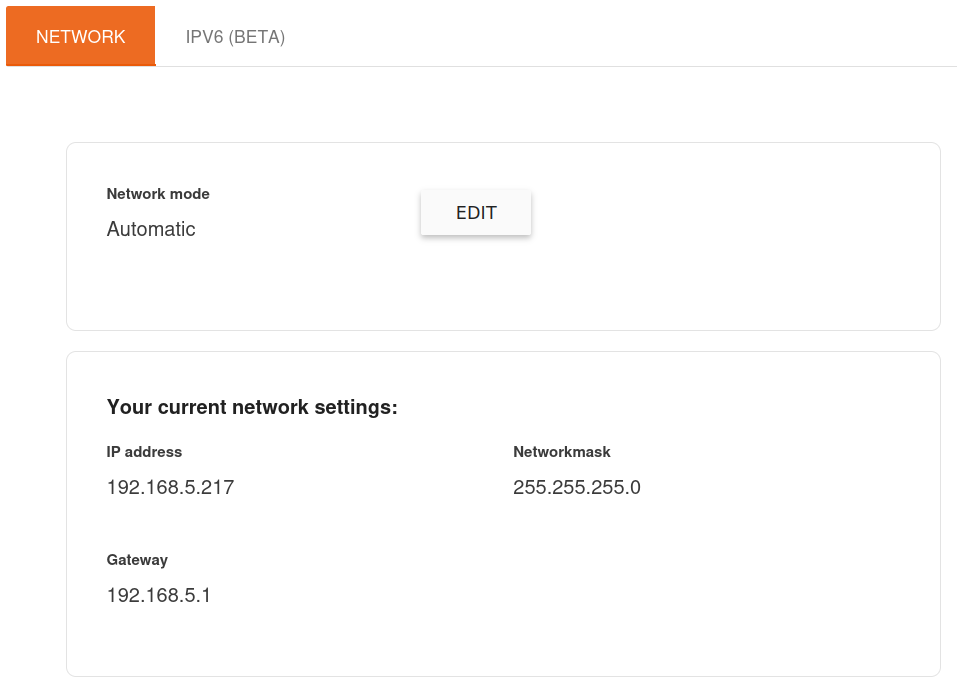
But I have this ads in youtub(e) so something not right. Attempting your suggestion to go to edit to use Expert Mode I can't edit only the DHCP settings on there to give it my dhcp server 192.168.5.1. I can only edit the fields "ip address" and "gateway". The gateway does not need to be changed. Then only when changing the "ip address" field, it sets both services to the same ip: the ip address of eBlocker and of the dhcp server.
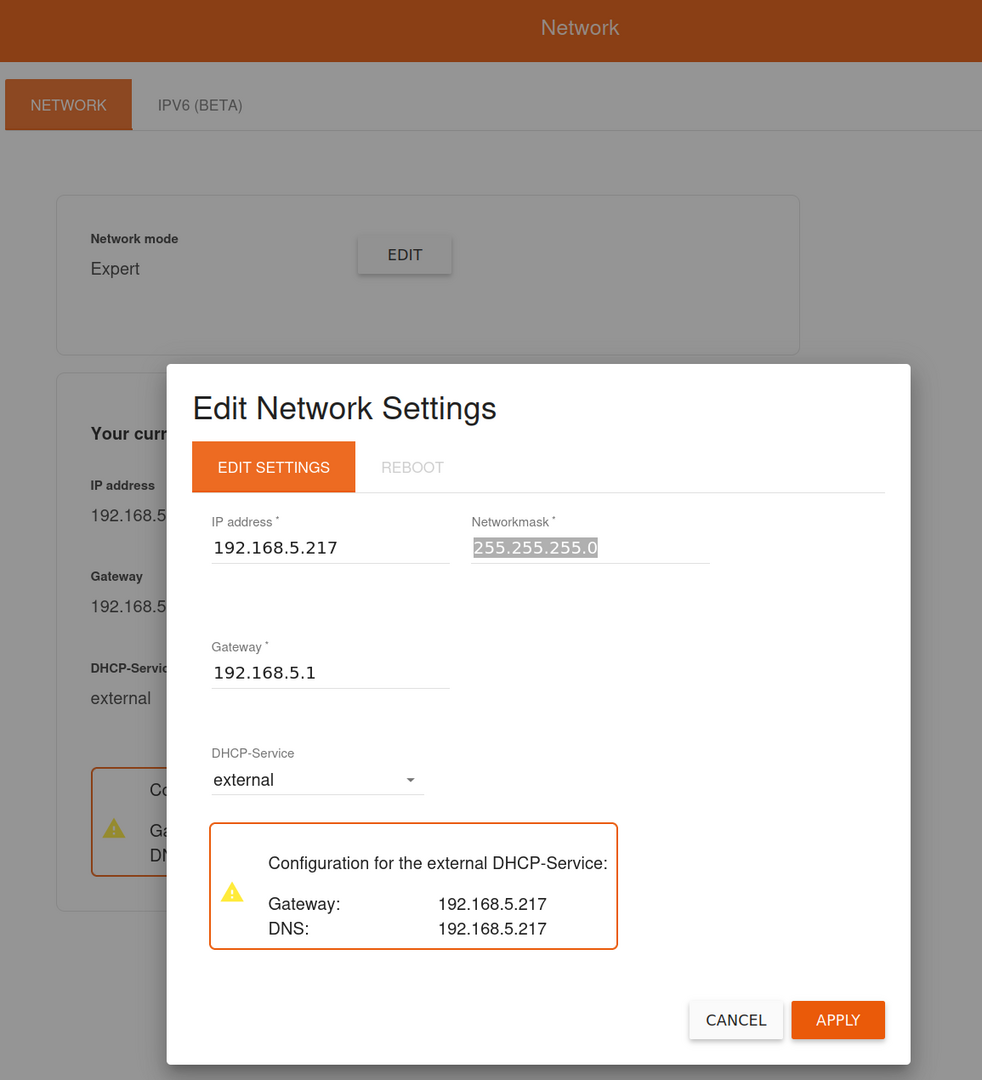
If I understand you, you suggest to have ip of eBlocker as is for example 192.168.5.217 ; ip of gateway as it should be 192.168.5.1 but ip of the dhcp server to what that is and in my case it is 192.168.5.1 same as the gateway. Expert mode doesn't allow me. Is there another way to do it ?
@cooks The IP of your DHCP server is irrelevant.
Make sure to configure your DHCP server to distribute the Gateway and DNS as indicated in the red box in your screenshot. Done.
This makes sure that the client (from DHCP it gets it's IP, the Gateway .217, the DNS .217) sends DNS requests as well as all traffic to eBlocker first (which acts as the gateway).
Client->eBlocker->Internet
If you feel like inspecting/routing/modifing the outbound trafic, just set the Gateway in eBlocker Expert Mode to the IP of the inspection server.
Client->eBlocker->inspection-server
THX!
Addition: For forwarding DNS requests to some internal DNS infrastructure (like unbound) go to Settings>DNS-Blocker. There chose External DNS Server. Under the tab External DNS Servers add the IP of your unbound DNS. Remove all other entries.
THX!
@cooks The IP of your DHCP server is irrelevant.
Make sure to configure your DHCP server to distribute the Gateway and DNS as indicated in the red box in your screenshot. Done.
This makes sure that the client (from DHCP it gets it's IP, the Gateway .217, the DNS .217) sends DNS requests as well as all traffic to eBlocker first (which acts as the gateway).
Client->eBlocker->Internet
If you feel like inspecting/routing/modifing the outbound trafic, just set the Gateway in eBlocker Expert Mode to the IP of the inspection server.
Client->eBlocker->inspection-server
THX!
Aha!. That was the understanding I was missing. Those settings in the red box are those to give to my DHCP server. I need to try that. Thank you.
One more and separately: I saw your question regarding VM images being old and seen the pdf on how to get a newer one for a qnap device. I'm going to have to use that to try to convert the ova to a vmdk so I can replace my version 3 with a beta 4. But I don't have a qnap so going to have to use other mechanism to convert. Your instructions can be followed but don't match. I suspect the v 4 matches.
I've done it now. Imported the OVA to Proxmox, then uncompress it with tar.
I had created a new VM by cloning the existing one of eBlocker 3, then removed the cloned hard disk leaving it without a hard dis. Then import the vmdk from the ova into this VM. Sill have it here, so will add it to comment for anyone later:
root@pve2:/var/lib/vz/import# ls -alh
total 1.3G
drwxr-xr-x 2 root root 4.0K Jan 22 14:29 .
drwxr-xr-x 8 root root 4.0K Jan 22 14:18 ..
-rw-r--r-- 1 root root 1.3G Jan 22 14:29 eBlockerVM-4.0.2-amd64-beta.ova
root@pve2:/var/lib/vz/import# tar xvf eBlockerVM-4.0.2-amd64-beta.ova
eBlockerVM.ovf
eBlockerVM-disk001.vmdk
eBlockerVM.mf
root@pve2:/var/lib/vz/import# ls -alh
total 2.6G
drwxr-xr-x 2 root root   4.0K Jan 22 14:59 .
drwxr-xr-x 8 root root   4.0K Jan 22 14:18 ..
-rw-r--r-- 1 root root   1.3G Jan 22 14:29 eBlockerVM-4.0.2-amd64-beta.ova
-rw-rw---- 1 lp   daemon 1.3G Aug 20 14:04 eBlockerVM-disk001.vmdk
-rw-r----- 1 lp   daemon  191 Aug 20 14:06 eBlockerVM.mf
-rw-r----- 1 lp   daemon 6.4K Aug 20 14:04 eBlockerVM.ovf
root@pve2:/var/lib/vz/import# qm importdisk 105 eBlockerVM-disk001.vmdk nest-2 -format qcow2
importing disk 'eBlockerVM-disk001.vmdk' to VM 105 ...
format 'qcow2' is not supported by the target storage - using 'raw' instead
transferred 0.0 B of 8.0 GiB (0.00%)
transferred 81.9 MiB of 8.0 GiB (1.00%)
transferred 163.8 MiB of 8.0 GiB (2.00%)
transferred 246.6 MiB of 8.0 GiB (3.01%)
{snip}
transferred 7.8 GiB of 8.0 GiB (97.18%)
transferred 7.9 GiB of 8.0 GiB (98.18%)
transferred 7.9 GiB of 8.0 GiB (99.18%)
transferred 8.0 GiB of 8.0 GiB (100.00%)
transferred 8.0 GiB of 8.0 GiB (100.00%)
unused0: successfully imported disk 'nest-2:vm-105-disk-0'
root@pve2:/var/lib/vz/import#
I've just had a zoom call dropping off. Had to pause eBlocker on the device but I'm finding it hard to diagnose. Mostly because I'm still unclear on the flow of the network packets. And the current and understandable UI limitations. Luckily I could pause it from one of the two places that seem needed to manage:
The device in question from the list o devices: http://192.168.5.217:3000/settings/#!/devices/list/
The place for the device itself http://192.168.5.217:3000/dashboard/#!/main
However when in the moment when you want to see why some website (zoom call for instance on web) fails, I couldn't find easily where to find that . And the stats of blocks I can't see the detail behind them, only a counter. That is a problem for diagnostics.
It could well be I'm still too new to it. I will have to place a new post when I can express the question clearly.
@cooks Just activate the trusted app for zoom and you should be fine.
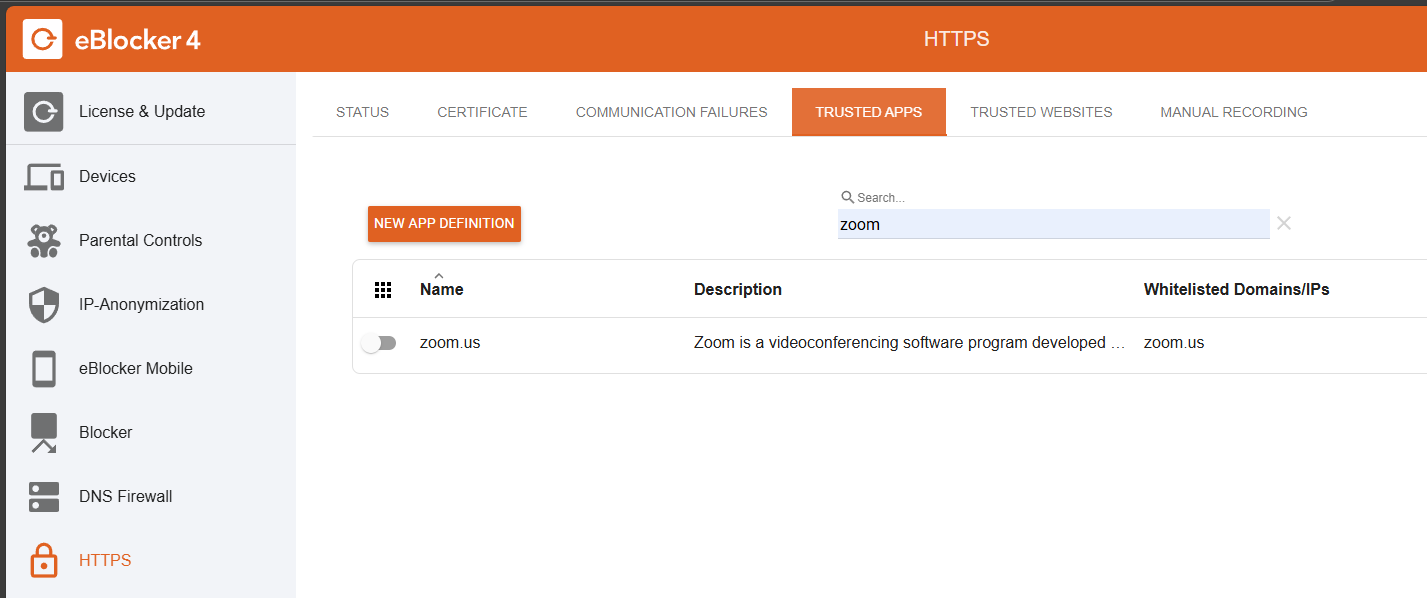
For the rest of questions you may join the german eblocker discord channel so we can discuss your questions there!
best regards
@cooks I'd recommend to work thru the Setup Instructions where the setup, Trusted Apps, Network Configs etc. are fully discussed. This helps you to a perfect setup without guessing.
And yes, the forum is the right spot to get English support. Discord is for German speaking people only - and I guess @Calimero believes most users are Germans (which is obviously not the case).
THX!
@cooks Here you are https://discord.gg/Bydt5uv5ZW
And besides Randoms comment, we do not only speak&write german.
So everyone is welcome and translation tools are worldwide available for nearly every language in 2026
😉
Best regards
@calimero I feel it's not helpful mixing up English speaking users in a German board. 👎 It's great you are helping users who speak German only. Please stick to this mission and stop irritating the non German audience.
@cooks This forum is the official spot for all users looking for official eBlocker support speaking English. It's carries valuable information with all support requests from the past five years and it can be searched easily. Answering all requests within 24h is our goal here.
THX!
Thank you both, I appreciate both offers of assistance.
I have been going through the documentation for Setup Instructions and pretty much all of it but I am still unclear. Why? Because it is written for going from zero to full protection on a almost non-technical audience. A good achievement really, but leaves us a little more techie people with plenty of questions when we want to accommodate the eBlocker into our preferred solution.
I am not going to criticise the documentation for this project. Having seen the roots of the project, it is amazing that it is still going. However I am having to be asking question bit by bit.
I'll make a new post.