

Since switching to a pure UniFi network, I have had a problem integrating eBlocker. I have tried everything I can think of to resolve the issue, but so far without success. That is why I am now posting my problem here.
Perhaps some background information first: I have been using eBlocker for years. I originally purchased the white cube and have been very satisfied with it.
Since switching to the UniFi network (Cloud Gateway Fiber incl. various access points and switches), I have been experiencing unstable internet access when eBlocker is active as a DNS server and filtering traffic. The DHCP server is the UniFi router (before the switch—most recently a FRITZ!Box 5590 with Wi-Fi via Apple Airports—I used eBlocker as the DHCP server).
I have installed eBlocker 3 on a Raspberry Pi 4, which I used successfully for years. In addition, as part of my problem analysis, I purchased a Raspberry Pi 5 with 8 GB RAM and installed eBlocker OS 4 on it. Both eBlockers basically work. Both use the ISP’s DNS server or 8.8.8.8 as a custom DNS.
Currently, I am experimenting with eBlocker 4 only. eBlocker running OS3 is shut down.
However, when I set the IP address of the primary DNS on the UniFi router to the eBlocker, things become unstable. Websites load sporadically (not systematically) extremely slowly or not at all (browser error messages indicating that the internet connection has been interrupted). Games such as Mario Kart Tour on the iPad get stuck during startup, even though all referenced pages are whitelisted in eBlocker. When I perform manual recording, I no longer see any accesses where eBlocker is “enabled.” Nevertheless, the app refuses to work.
HTTPS is enabled on all devices and the certificates are installed. When I run functional tests, I only see “green check marks” everywhere.
I have tried all kinds of configurations. In no setup have I achieved a stable network with eBlocker integrated. Listing everything here would go beyond the scope and, in my opinion, would not be very helpful anyway.
If I remove eBlocker from the network (shutdown), the network runs very well and very fast—albeit with all the usual disadvantages that come with that.
I would now like to try again in a more systematic way, ideally with the help of eBlocker experts. I would not consider myself a beginner, but I am certainly not a networking expert either.
Maybe someone here can still help me—I am close to giving up. Thanks in advance!
Hi,
I have an 100% Mikrotik network, only using the Fritzbox als cablemodem.
My Mikrotik Router is the DHCP server
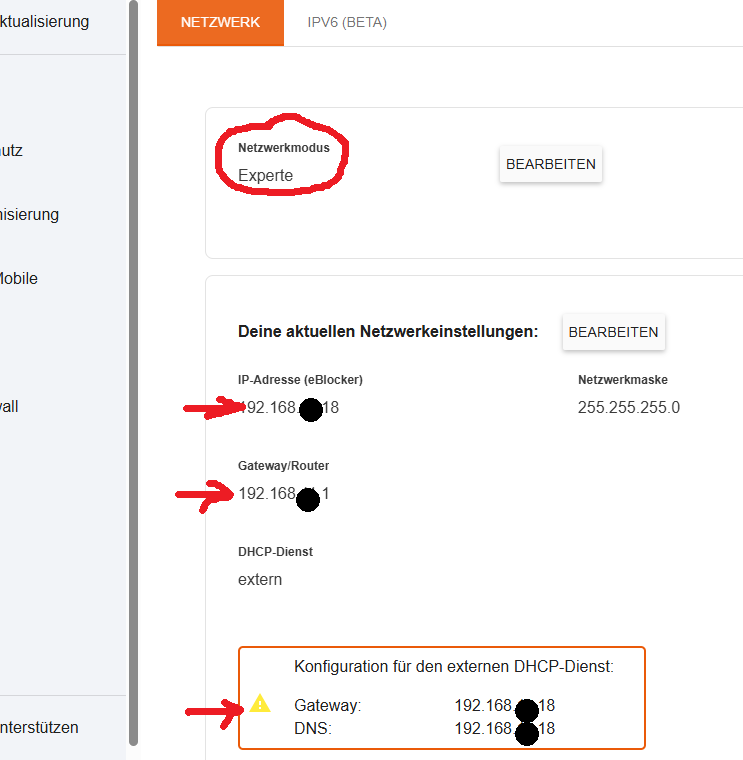
In the DHCP Options of the DHCP Server I give for the Clients
the Gateway and the DNS th IP of my EBlocker.
Here is the example from my setting 😎
regards PIO
Thanks, @pio78. Can you please explain this a bit? What means to set the Gateway to the eBlocker in the Router (-> DHCP Server)? What happens then exactly?
As I tried many things myself (what you propose I did not try yet - would have never got to this myself), I want to understand the implementation behind it.
Thank you! Will give it a try - when I can play round without annoying my family … 😉
Just made the change. Seems to work perfectly! Thanks again, @pio78!
Can you maybe briefly explain what these settings mean, in particular, to set the gateway in the Ubiquity Router to the eBlocker (I would have never tried this myself; too much a rookie 🙂 )? Why is it not sufficient to set the DNS server to the eBlocker-IP?
Why is it not sufficient to set the DNS server to the eBlocker-IP?
See https://eblocker.org/community/announcements/why-directing-dns-to-eblocker-is-not-sufficient/
And yes, it's totally OK not to use the forum's search. We are happy to point you to the right direction. But sometimes you might find answers to your questions even faster...
THX!
Sorry, yes, I should have had a look at the forum myself. Thanks for the link anyway - I was not aware of the importance to use eBlocker also as gateway.