

Hi,
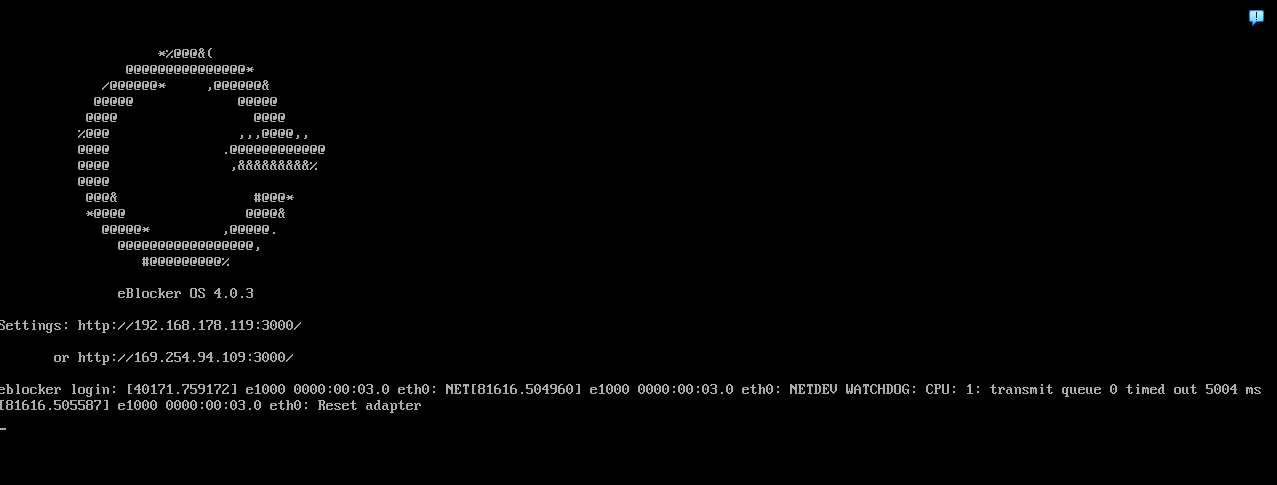
first of all I'm not tech savy, but while testing eBlocker OS 4.03 I'm getting this error message on the VirtualBox VM (see the attached picture):
"[40171.759172] e1000 0000:00:03.0 eth0: NET[81616.504960] e1000 0000:00:03.0 eth0: NETDEV WATCHDOG: CPU: transmit queue 0 timed out 5632 ms [40171.759946] e1000 0000:00:03.0 eth0: reset eth adapter"
and this keeps on repeating multiple times a day.
Now I read in the Red Hat documentation that this could be because the Linux kernel stopped receiving completed packets from my network interface card (NIC) for too long. Suggestion there is to force a driver reset using ethtool to turn off tx and rx checksum or segmentation offloading. Is this a plausible explanation? And is it possible for me to test that in eBlocker since it is a closed OS?
Any help is appreciated 🙂
About my setup: Function testing is all green except for IP6 which I disabled in the router
- Hardware you use for running eBlockerOS > Intel NUCi7 with Intel PRO/ 1000MT Desktop NIC running as a server in network
- eBlockerOS version as well as filter lists version > 4.03
- eBlocker network mode (auto, individual or expert) > auto
- eBlocker network settings (IP, mask, gateway) > Automatic, IP address 192.168.178.119, Networkmask 255.255.255.0, Gateway 192.168.178.1
- Which devices runs DHCP server? Router/external, eBlocker or client fixed IP? > Router runs DHCP, clients have locked IP's
- IPv6 disabled for client/network? Disabled in router
- eBlocker DNS firewall settings > eBlocker is DNS Server, forwarding DNS requests is Default
- Client network settings (IP, mask, DNS, gateway) >192.168.178.38
- Whether eBlocker’s https integration is enabled for client > Yes
- Client browser and OS version (i.e. FireFox 80.1 running on macOS 13.4) Win11 24H2, Edge 154.0.4258.53
- Additional non default Blockers enabled? (like DuckDuckGo, Consent-Blocker, custom lists etc.) > No
- HTTPS Auto Trust App enabled? > No
- Exact way or a link / screenshot to reproduce the issue
- If VPN or Tor is enabled for the client in eBlocker (and which VPN provider you are using) >No
- Are automatic updates enabled? > Yes
Hi,
This is a known issue in Virtual Box, and the good news: you can test the fix entirely from VirtualBox on Windows - no access to eBlocker needed.
WHAT THE MESSAGE MEANS
"NETDEV WATCHDOG: transmit queue timed out" is the kernel's safety net: eBlocker handed packets to the NIC, ~5.6 s passed without the hardware confirming transmission, so the kernel forced a driver reset. Each event = a brief network drop. It's a symptom, not the cause.
IS THE RED HAT OFFLOAD EXPLANATION PLAUSIBLE?
Partly. The ethtool workaround is real — but for physical Intel 8254x cards. Your "PRO/1000 MT" in VirtualBox is an emulated adapter, so in a VM the likelier causes are: Windows stalling the host (updates, antivirus, disk), PCIe power saving on the NUC, the VM being underpowered (eBlocker with HTTPS integration is CPU-hungry), and only then the emulated e1000 offload path.
WHAT TO TEST, IN ORDER (minutes each, then observe a few days)
- VirtualBox → Settings → Network → Advanced → Offloading: untick all three boxes, power the VM off, start it. This does exactly what ethtool -K tso off gso off would do inside eBlocker, from the outside.
- On the NUC: Power Options → Advanced → PCI Express → Link State Power Management → Off. Fixed exactly this symptom on NUCs.
- Give the VM 2 vCPUs, 2 GB RAM; VDI on the SSD, not a spinning disk.
- Adapter switch: Settings → Network → Advanced → Adapter Type → "Intel PRO/virtualnet" (virtio). Different driver path, also faster. Caution: if the eBlocker image lacks the virtio driver, the VM gets no network and you can't install it. So: take a snapshot first, switch, start, verify eBlocker still gets 192.168.178.119 and your client can browse. No network → restore snapshot (that result is still useful data for support). Keep the MAC address fixed when switching.
Hope this works for you.
Thank you for your explanation, very clarifying. Knowing the error-message was just the symptom helped me a lot.
Thanks also for your test suggestions. I assume it may help others the provide some feedback:
1. in VirtualBox (version 7.2.20) I could not find anything related to Offloading so I could not test this unfortunately, and
3. luckily I already had implemented, but
2. did work out as you said. Since then no errors anymore.
So thank you very much for your help !