

My white cube stopped working some weeks ago, so I was looking how to replace it and got an mostly unused Raspberry Pi 3 model B from a colleague.
Setting up worked fine but after some hours/a day I still can see the eblocker active in my FritzBox, but I cannot access Settings page nor Dashboard. I even connected a monitor to the Raspberry and it seems to be running and is showing me two IP addresses. Neither of them works.
When I disconnect power and connect it again. Everything works again and Settings & Dashboard are accessible, till on the next day I face the same issue again.
Any idea or recommendation how to proceed?
Thanks a lot!
I cannot access Settings page nor Dashboard.
What exactly does this mean? How are you accessing the Dashboard (exact URL) and what do you get as response (screenshot)?
To avoid too many back-and-forth questions, it's desirable to provide an overview of your setup: https://eblocker.org/community/announcements/before-posting-here-please-read/#post-117
THX!
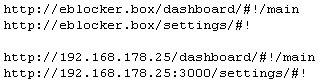
I am accessing the Dashboard via removed link !/main
and the Settings via removed link !
Error message is always:
Hmmm...diese Seite ist leider nicht erreichbar
eblocker.box haben die Verbindung verweigert.
Versuchen Sie Folgendes:
Die Verbindung wird überprüft…
Proxy und Firewall überprüfen
ERR_CONNECTION_REFUSED
Alternativly via removed link !/main or removed link !
Then there is no answer at all.
Both methods work well if the Raspberry is disconneted for a short time.
And everything else looks good after reboot as well.
I never faced this problem during all the years with the white cube!
Hardware you use for running eBlockerOS: Raspberry Pi 3
eBlockerOS version as well as filter lists version: 3.2.3 2026-01-21-07-37-08
eBlocker network mode (auto, individual or expert): auto
eBlocker network settings (IP, mask, gateway): IP 192.168.178.25, mask: 255.255.255.0, gateway: 192.168.178.1
Which devices runs DHCP server? Router/external, eBlocker or client fixed IP?: Fritzbox 7590 AX
IPv6 disabled for client/network?: no
eBlocker DNS firewall settings: extern 1.1.1.1 and 9.9.9.9
Client network settings (IP, mask, DNS, gateway): 192.168.178.1
Whether eBlocker’s https integration is enabled for client: yes
Client browser and OS version (i.e. FireFox 80.1 running on macOS 13.4): EDGE 144.0.3719.82, Windows 11
Additional non default Blockers enabled? (like DuckDuckGo, Consent-Blocker, custom lists etc.): no
HTTPS Auto Trust App enabled?: yes
Exact way or a link / screenshot to reproduce the issue: see above
If VPN or Tor is enabled for the client in eBlocker (and which VPN provider you are using): not enabled
As the URLs got removed here a screenshot, which URLs I use:
@rolmue How much RAM has your Raspi 3?
Are you connecting the client via LAN (cable) or WLAN? Please stick to LAN (cable) for further tests, if possible.
Then there is no answer at all.
Strange. The browser will always answer after a while. Please wait till you get a response and take a sceenshot of the error message.
Can you please confirm this behaviour also happens when accessing "http://192.168.178.25/settings". Please double check in your router eBlocker's IP address is correct (...178.25) or change the URL accordingly.
Last: Safest bet for network settings is "Individual Network Mode". I'd suggest to change this asap to avoid issues.
THX!
@random @rolmue In the first post it says Raspi 3 with 1GB!
This is far too less, as the eblocker will hang itself up because of the lack of RAM and only a restart will get it back to work for a few hours again, before the RAM is full again.
You will need at least 2GB of RAM but I propose 3GB RAM as my VMs with only 2GB RAM will also stuck when the RAM is full.
Best regards
@calimero Thanks! That would explain why it only works a limited time. On the other hand I think Raspberry Pi 3 always only had 1GB RAM and was working in the past and some weeks ago mentioned also on the webpage. The version 3 image is provided for Raspberry 2, 3 and 4 with <1GB so I would have expected it to work.
@rolmue this info is from the time as eBlocker was v1 and v2. Since v3 1GB was not enough to run eBlocker in a stable way
@rolmue @calimero Sorry for overseeing the 1GB hardware. We could have saved our time.
@rolmue 1GB is no longer supported nor is eBlockerOS 3. Please upgrade to a supported platform. See download page.
@calimero Officially 2GB RAM is absolutely fine for a Raspberry Pi. There is plenty(!) of RAM space left for future expansion. Recommending more RAM makes absolutely no sense. Please stick to the official recommendations not to mix-up the users with conflicting information.
THX!
@random Just to correct you, 2GB RAM is not enough space!
My Proxmox eBlocker instances are running now for a long time and I've tested different RAM & CPU settings and the facts from my side are speaking against the 2GB RAM version.
But this is still my point of view 😉
Best regards
2GB RAM is not enough space
@bpr Could you please comment on @calimero's "view" with hard facts.
If he's right we need to adapt the official recommendation. I feel this might be a VM "view" and he's misleading the audience here. Reminder @calimero: This thread is about Raspi requirements (not VM).
THX!